u/RedMser
RedMser
RedMser
To add to this: Make sure to change the interpolation mode of the transition to "Constant" (press T with the keyframes selected in dopesheet). Otherwise, you will get artifacts during that 1 frame jump when rendering with motion blur.
RedMser
Try with the latest version of Blender, maybe it is a bug that has already been fixed.
RedMser
It's vyper's pose when respawning as well now (unless that was a bug lol)
RedMser
Try to subdivide the mesh more, it looks a bit low poly.
RedMser
Can you share an example of what such a material looks like in Blender shader node editor, and the UV map as well?
I wonder if it's like multiple albedo textures, or if it's one texture for roughness, one for metallic etc. I also wonder if it's using UDIMs or not.
RedMser
In pose mode hold down period to open a menu, there make sure "Only Locations" is turned off.
RedMser
My first thought would be to look into grease pencil, since it has a bunch of effects and modifiers for adding noise, and generally is a good fit for "2D drawings in 3D space". Can also be automated using Line Art.
Or if you still want the eyelashes to be a mesh, you could alternatively follow my initial advice of using a texture with an alpha channel, just that you would paint with a hard edge brush instead of a soft one.
RedMser
It would help to know what art style you are trying to go for, e.g. a reference picture.
But assuming you don't want to attach actual hair to the mesh, you could try to paint a texture with an alpha channel to soften the borders and add details.
RedMser
Search for their posts on the official deadlock discord. There's a google drive link somewhere.
RedMser
IMO instead of pressing up/down to manually climb ladders, it should automatically do it when you land on them or jump into them with enough force. If that works with the level design, that is.
RedMser
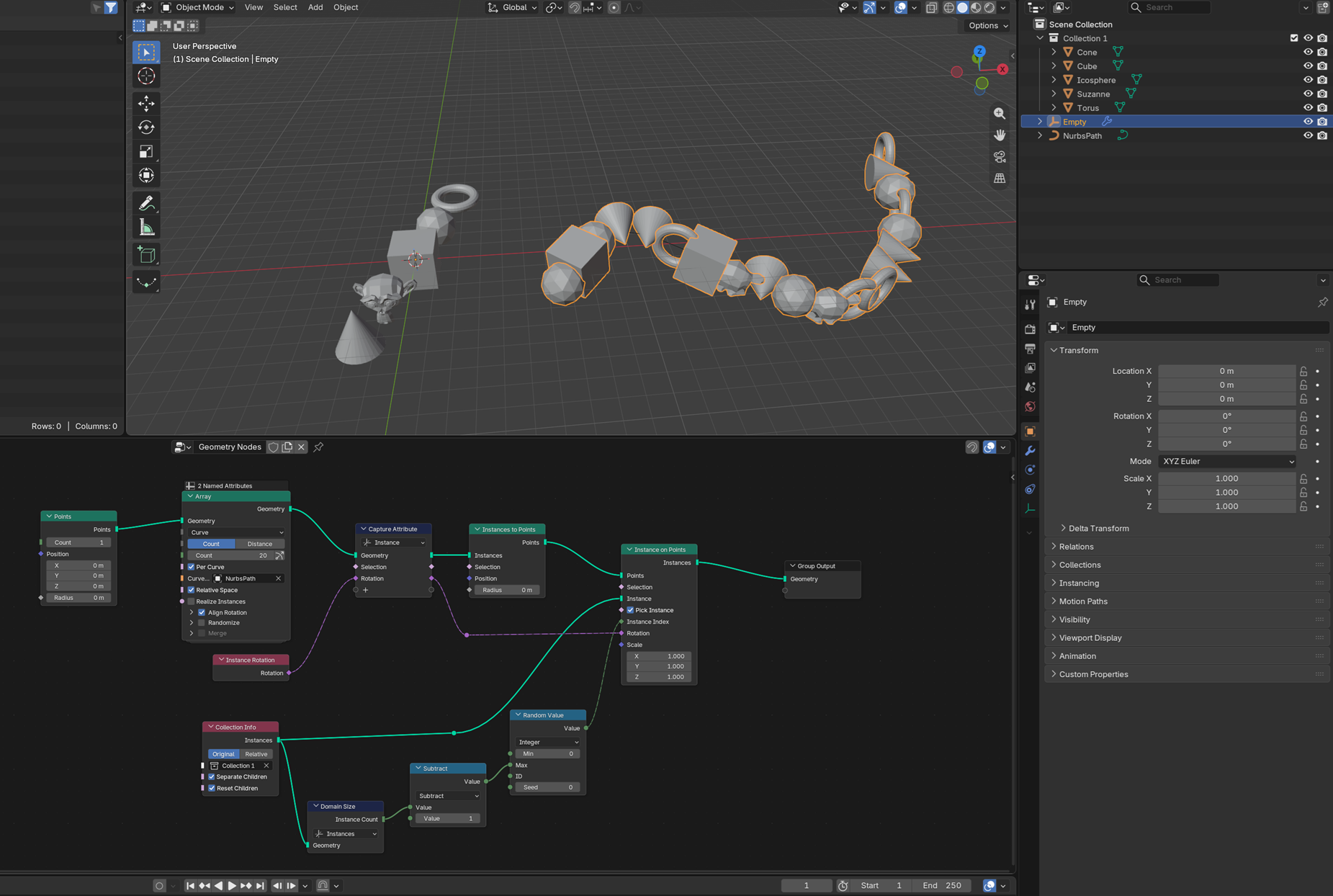
It's a bit convoluted, but here's one way you can do it, while still using the "Array" geometry node. It's a custom geometry nodes setup:
RedMser
It says "Destination: \fm20end.map" but it should probably show a full path there, like C:\Program Files ...
But also weird that it starts with a copy, instead of running the actual compilers. Can you show a screenshot of the compile window that shows up before this one?
RedMser
According to this, you want to copy/keep the "resources" in tact: https://developer.valvesoftware.com/wiki/VTF_(Valve_Texture_Format)
You might need to program a little tool yourself which opens two VTFs, and copies everything from A but only the particle sheet data from B, saving into C. I have no experience with VTF libs, but google listed this one which seems capable: https://srctools.readthedocs.io/en/v2.6.1/modules/vtf.html
Edit: the linked one seems to also have "sheet_info", not sure if that's the same...
RedMser
You should definitely never have exactly overlapping geometry, so you should do it on both sides even if only one side is showing flickering.
Once you start rendering in eevee, in cycles, or if you export the model to a game engine, it might break in different ways (maybe the lighting is black, or some faces are just missing visually, for example). Even changing camera settings can change the effects, so it's really "random" and "glitchy" in that sense.
If the stockings aren't using a transparent (alpha channel) material, you could also add a Mask modifier on the base mesh to hide the actual legs geometry instead.
RedMser
In Blender 5.2 (currently in beta), there is a Principal Components geometry node, which might do exactly what you want. You just need to transfer its results to an attribute, then read that attribute from the shader.
RedMser
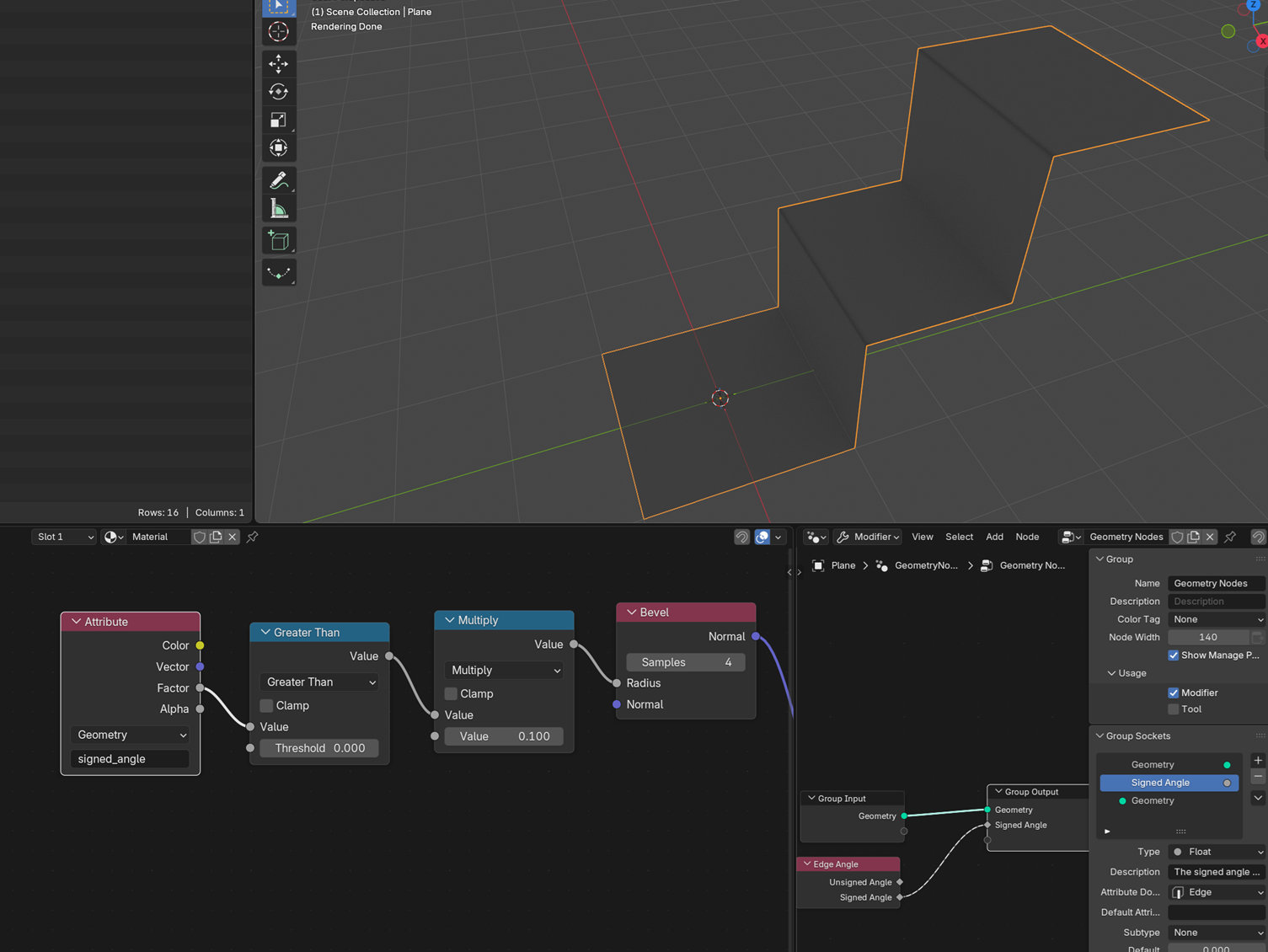
You can use geometry nodes to store the signed angle on edges (use the Edge Angle node, and make sure to set the domain to "Edge" on the group output).
Then you can check for it in the shader, like so: https://files.catbox.moe/456aqc.png
RedMser
Hi. Even though you solved the core issue, you might still want to turn on Bendy Bones as well, to make the curvature look even smoother at tighter angles.
RedMser
Not OP, but you can do this either with Dynamic Paint, or with Geometry Nodes (simulation nodes + geometry proximity, or SDFs).
RedMser
You could mess around with the NLA editor. E.g. each pose gets its own strip, all stacked on top of each other, and you use animated influence to change how it animates from one to the next.
RedMser
It actually used to be m/s. No idea why it was changed, but it seems to be an intentional change.
RedMser
Report them for cheating in game, Valve has already banned other Doorman players exploiting out of bounds in matches.
RedMser
Reminds me of a game I made for a jam, that fit into 495 characters of GDScript and uses just a single node (and project settings to define key bindings). So it's as few characters as possible, while yours is as few lines as possible, haha.
extends Tree
var x:=2
var a
var d=3
var W=1
func _process(E):
    if !a:seed(4);a=range(99);a.shuffle();a.resize(60)
    queue_redraw();var v=Input.get_vector("a","d","w","s").sign();x+=v.x+v.y*9
    if a.find(x)+1:free()
    if v:d=max(0,v.x);if v.y:d=max(0,v.y)+2
    if Input.get_axis("v",""):
        W^=1;var O=x+[-1,1,-9,9][d];if W:a.erase(O)
        else:a.append(O)
func _draw():if a:for i in a:draw_rect(Rect2(i%9*8,i/9*8,8,8),Color());draw_char(ThemeDB.fallback_font,Vector2(x%9*8+2,x/9*8+6),"<>^v"[d],7,Color())
Some notes:
Treeis the shortest name for a CanvasItem- x is the position of the player (as a tile index in reading order).
:=to implicitly convert to int for Array.find call later - a is the tilemap array (also in reading order). Values are indices for where pits should be, everything else is tiles.
- d is facing direction: 0 left 1 right 2 up 3 down
- W is wand contents (your inventory basically).
- First if-check runs for the first frame only: initialize tilemap
- Second line handles movement. Game runs at 5 fps so
_processruns really infrequently. - Third line handles death (by deleting the root node). I tried crashing with type errors here, but even in debug builds they don't halt execution in web builds somehow!
- Fourth line sets facing direction depending on previous input ("if v" ensures that no input means no change in direction).
Input.get_axis("v", "")is a shorter syntax for detecting keypress (the tradeoff is that it's spamming errors in console).- Next two indented lines handle wand usage.
- Finally rendering is done (only if tilemap is initialized already). Uses ASCII characters for facing direction.
RedMser
You can even see how short the window is in this clip, the soul turns from black to cyan and black again in a very short time frame.
RedMser
In S2V you can ctrl+F for sign, then sort by file type, and decompile&export all the "vtex_c" files. I think that's what most of them are called.
Create a mesh object and give it a material that has Principled Volume connected to the Volume socket.