u/beatbox9
beatbox9
beatbox9
lol I'm not sure what you think Zorin is but it's basically Ubuntu LTS with a few small modifications. It's not a full standalone distro. It's like imagine if you made a theme and then just repackaged Ubuntu LTS with that theme. It's similar to Mint in this sense (though much smaller than MInt); and here's a breakdown of Mint, showing that it's only 0.25% original software: https://www.reddit.com/r/linuxquestions/comments/1wx7i1t/comment/pdud67g/
The entire Zorin team is like maybe 2 people....like two brothers named Zorin. I can guarantee you the "CEO" has no secretary.
So congrats on getting an email back if that makes you happy.
beatbox9
Would a z6 iii be recommended?
Yes. Think about it like this: the Z6iii has full point-and-shoot automatic modes along with professional manual modes. It has a really, really wide range of potential users: it's a great camera to begin with, learn on, grow with, and use even as a professional.
Make sure you pair it with a good lens. If you want just a single lens, check out the 24-120mm F/4S and the 40mm F/2.
beatbox9
You're shooting digital, correct? So start by learning what ISO is in digital, how it is completely different from film, and how it even affects the workflow and decisions differently on film vs digital: https://arslaan.studio/the-digital-iso-film-analogy/
Basically, you should just expose as much as you can, and then the ISO is what it is. And contrary to popular belief, raising ISO does not add noise.
beatbox9
You should learn what ISO is and isn't (in the digital sense): https://arslaan.studio/the-digital-iso-film-analogy/
So "ISO 3200...... + 2 2/3 stops" is not really ISO 3200. And regardless, it's really the exposure and the enlargement that you have to watch out for: https://www.dpreview.com/forums/threads/24-70-f4-vs-apsc-f2-8-lenses.4467471/#post-63646586
Learn some of those basics first.
beatbox9
Ever had a QR code on your monitor and grabbed your phone to scan it?
No, because if someone is dumb enough to use a QR code online (QR codes are specifically for going to hyperlinks in the physical world) rather than just using a link that I can click, then I'm not going to bother going to the link at all.
beatbox9
You didn't really address the questions. But regardless: you asked why yet another package manager? Because snap does some stuff better than apt/deb and flatpak. (And snaps are cross distro / cross platform).
But they are all different. For example: snaps are good for headless system apps that need to be upgraded frequently. Apt / deb suck for this, since they need to be produced for each version of the distro and can be a maintenance nightmare in terms of effort. And Flatpaks suck for this since they can't do headless system apps at all. So this is one example of 'why yet another package manager.'
And this is before noting that snaps are older than many other package types, such as flatpaks. And how they're not vm's.
But again: just don't use them if you don't want to.
beatbox9
I don't think I understand the logic. You went from Ubuntu to Ubuntu Studio because of snaps...?
First: ew, why are you using ubuntu studio instead of just plain old Ubuntu LTS?
Second, just remove the snaps and disable snapd from installing if you don't want them. The snaps are not essential--most of the packages are just libraries to make other snaps work. The only real snap would be firefox, which you can just easily replace with the non-snap version: https://support.mozilla.org/en-US/kb/install-firefox-linux#w_install-firefox-deb-package-for-debian-based-and-ubuntu-based-distributions-recommended
Snaps are just another packaging format; and they're really good for some types of software (and there are better package types for others). And so just like you wouldn't use flatpak for everything, just don't use snaps for everything (or even anything). So I don't understand what the issue is?
I also don't understand why anyone in 2026 would use ubuntu studio but that's a different issue.
beatbox9
No. The comic doesn't really make sense, because Mint is not a different person.
Like Debian and Ubuntu would be two different people--let's say Mario and Luigi.
But Mint would just be Mario or Luigi but wearing a different outfit.
beatbox9
They are basically the same thing.
Mint is just a pre-customized version of Ubuntu. Mint is around 99% Ubuntu and around 0.25% original software (like themes), with the remaining stuff in-between being software they take from debian instead of ubuntu.
Contrary to what some people here will say, Mint is not "based on Ubuntu" in the same way that Ubuntu is based on Debian. Both Ubuntu and Debian are full, independent distros; while Mint is only a small add-on customization layer to either Ubuntu or Debian.
See my post here: https://www.reddit.com/r/linuxquestions/comments/1wx7i1t/comment/pdud67g/
But because it's customized, Mint has to first get the latest Ubuntu and then spend time trying to customize it. So ultimately, Mint is derivative and slower to update and more niche. Like for example, the latest Ubuntu 26.04 came out back in April; and the latest Mint is based on the Ubuntu that came out in April 2024--over 2 years ago.
You will learn more (and have a more modern and more mainstream Linux system) from Ubuntu.
So I would strongly recommend Ubuntu over Mint. Install the latest Ubuntu LTS, and then spend a few minutes customizing it as you see fit. And learn during this process.
beatbox9
I use both of those. Navidrome is great, and there are a bunch of phone apps you can use to connect to it (depending on android vs iphone). It's great--it's like having your own private spotify.
beatbox9
They usually just add or modify a small text file to a directory. This is how linux works (as opposed to the "windows registry," linux is just a bunch of plain text files in specific directories that specific software is designed to check).
One example is similar to the the Mozilla link above: for apt (the package manager for all debian-based distros), you tell it things like which repositories to look into. Mint uses a similar method to turn off Ubuntu's snaps with this single, 3-line text file (the first few lines are just comments--only the last 3 do something): https://gist.github.com/lmmx/0550cfc8867eb1eea04076ec69c95a5a
It has to add this because Ubuntu's apt preferences and repositories that Mint reuses are already set up for snaps. So Mint adds another layer to override Ubuntu's overrides.
And if you were to place a text file with that same text in that same directory ( /etc/apt/preferences.d/) on Ubuntu, it would have the exact same effect as on Mint: it would also prevent you from installing the snap process. Because this is just telling the apt package manager that for the specific package named "snapd", do not look in any repository for it--just skip it.
So that's one example of a config file that Mint changes (or in this case, adds).
Another example: to announce itself as Linux Mint (rather than Ubuntu), they can simply change this file ( /etc/os-release ) : https://man7.org/linux/man-pages/man5/os-release.5.html
That's a link to the manual on how to do this. This works on any distro. If you scroll through the manual at that link, you can see that you can even set it up so that most apps see it as Ubuntu or similar to Ubuntu (so that apps know how to be compatible), while the user sees a "pretty name" or "fancy name" of "Linux Mint" as a user-friendly alias. So apps think they are installing to "Ubuntu 24.04 LTS" and the user thinks they are running "Linux Mint 22" or whatever.
And in fact, here is what a bunch of different distros use as defaults for that specific file: https://gist.github.com/SwooshyCueb/4905ac15e3b5658f6c6907d9562af479
Like you could literally change the name of the "distro" on your computer right now by changing that one text file and rebooting.
For many things, you as a user can (and often should) do your own configuration files in your home ( ~/.config ) that will override distro-provided system defaults regardless of distro. You already have some of these that you may not know about. But like every time you change a setting or preference in any app, it will change a config file in this directory.
For example, I do this for my pipewire (audio) configuration, so that it doesn't matter what the system defaults are--my computer always has my own personal configuration; and this works whether I'm using Ubuntu or Fedora or whatever else. There's a deep dive on these types of things here:
(search for a dropdown section called "Configs in linux")
There's also a section toward the beginning called "Linux directory structure" which is related and useful.
Anyway, that's how. It's just relatively minor changes that you or anybody could make--and it's not that many changes. I haven't looked in depth, but for Mint specifically, it's almost certainly only just those 2-3 that I listed: announcing itself to the user as a different OS and a few repository (apt) changes.
In other words, you could probably make most of the exact same config changes that Mint makes on your own Ubuntu LTS system if you wanted to...and it would probably take you around 30 seconds.
beatbox9
Ideally, switch to a modern + mature DE like gnome or KDE Plasma. Which should mean switching distros. Mint today is centered around less mature, niche DE's like Cinnamon--that is really the only difference between Mint and Ubuntu.
For reference:
https://reddit.com/link/19rqjlnbo8pmr/video/8n7nhdhxz0yh1/player
Both of those are gnome (but could just as well be KDE). These modern + mature DE's have toolkits and engines that are fundamentally designed for things like blur, see-through opacity, frosted glass, etc. And these entire modern toolkits are GPU-accelerated, which means they perform better, while freeing up the CPU, while also using less battery.
So if I were you, I'd consider swapping distros and DE's--the most straightforward would be to Ubuntu LTS (with gnome), or Kubuntu LTS (with KDE Plasma).
beatbox9
Oh, that's good. I think the biggest one I still may have noticed is gnome software
beatbox9
A lot of people don't quite know what a distro really is. See my recent comment above.
PopOS is basically just 99% an older version of Ubuntu LTS with a small add-on repository for their custom, niche desktop environment they call "Cosmic."
And "Cosmic" is the buggy part: It's not a mature desktop.
It's conceptually similar to Mint, except Mint's Cinnamon is not a modern desktop. And I do a breakdown of Mint here: https://www.reddit.com/r/linuxquestions/comments/1wx7i1t/comment/pdud67g/
You should typically go for a mature + modern DE. This means either gnome or KDE Plasma. And go for a distro that is a relatively upstream, complete distro--so in this family of distros, this means Ubuntu LTS or Debian. But plenty of other upstream distros that are great too, like Fedora or Arch (among others).
I strongly recommend avoiding niche distros until they've proven themselves over the course of years..
beatbox9
"Distro" is short for "distribution."
TL;DR: Contrary to what a lot of people think (and you'll even see this from people who don't know any better in the replies here), a distro is mainly like an "app store" but for core operating system software. It's how people put together and maintain and support the operating system.
One easy way to think about it: it's sort of like the retailer where you buy products from in the real world. All of the retailers sell the same products, but each retailer has different customer service, warranties, etc.
Longer story:
Basically, with most software, you'd have to manually compile and install it. Like you have to tell it which directory to install to, which type of processor you use, and make sure you have the correct prerequisite system libraries and fonts already installed, then compile the software for this combination, and then copy the resultant files over. And any time you wanted to upgrade or delete software, you also had to repeat the above. All using the command line. It's how things used to be like 30 years ago, and it absolutely sucked.
So some people started thinking: why don't we just create standard directories and make "packages" of the software (since most people are using the same types of intel-compatible processors), and make "package managers" that could automatically identify 'dependencies' like which libraries and fonts the software needs, and we could put all of the packages in a repository (which started as CD's and eventually went online).
And then they started "maintaining" the software at different intervals. Like if there was a new version of the GUI desktop that came out every 2 months but some users hate major changes all the time (like think about going from Windows 10 to 11), some distros would lock the major version down for a few months or years and only provide security updates; while others would provide major changes and upgrades whenever they became available.
And some groups would choose to only provide open source software; while others were ok providing proprietary/licensed software also (such as fonts and drivers and codecs).
So several groups started taking their own philosophies and approaches to the above...on how to "package" and "distribute" the software easier, such as which software to provide, how to package it, how often to upgrade it, etc.
^ This is what a distro is.
And 20 years ago, the distro made a huge difference because you relied on it for everything. Like every single app. But things have changed; and now, we have universal package types and app stores (eg. "flatpaks" in flathub)--these give you the latest version of apps on any distro; and you can literally just click the "Install" button on that website to install apps. However, this only works for apps (think: "Instagram"), and not for the core operating system (think: Android or iOS): so you'll still want to rely on the distro for the core OS stuff.
Similarly: we also used to have to use different tuned versions of Linux for different things--like you might have a version that was more optimized for real-time processing and another that was better for power savings. But today, these tunings are all built-into a single Linux kernel and you can just click a button to switch them. You can see a good in-depth article on one example here: https://arslaan.studio/setting-up-a-linux-media-studio-workstation-audio-video-graphics-davinci-resolve-etc/
And so ultimately, it's all the same software--it's just installed and upgraded differently.
So when picking a distro, the main thing to look at is: how often will it make major changes to the core operating system and how long before it forces you to upgrade? Some (like Fedora) can give you the latest every 6 months but require an upgrade at least once a year. For some people, this is a lot and disruptive. For other distros (like Debian or Ubuntu LTS), there might be a new major upgrade every 2 years, with 5-years of support each, giving users some stability and plenty of time to plan around when to upgrade. And some distros like Arch or NixOS are even more aggressive or user-dependent. And some are even less aggressive like Rocky Linux.
Also, a bunch of niche distros also formed when they would do little things, like pre-install an app or come with a pre-installed theme or something else minor (like Mint or PopOS--which are both just basically Ubuntu LTS with a custom desktop & theme). This is unfortunately what a lot of noobs think a distro is, just because they don't understand what a distro really is.
beatbox9
self-host like jellyfin or navidrome
beatbox9
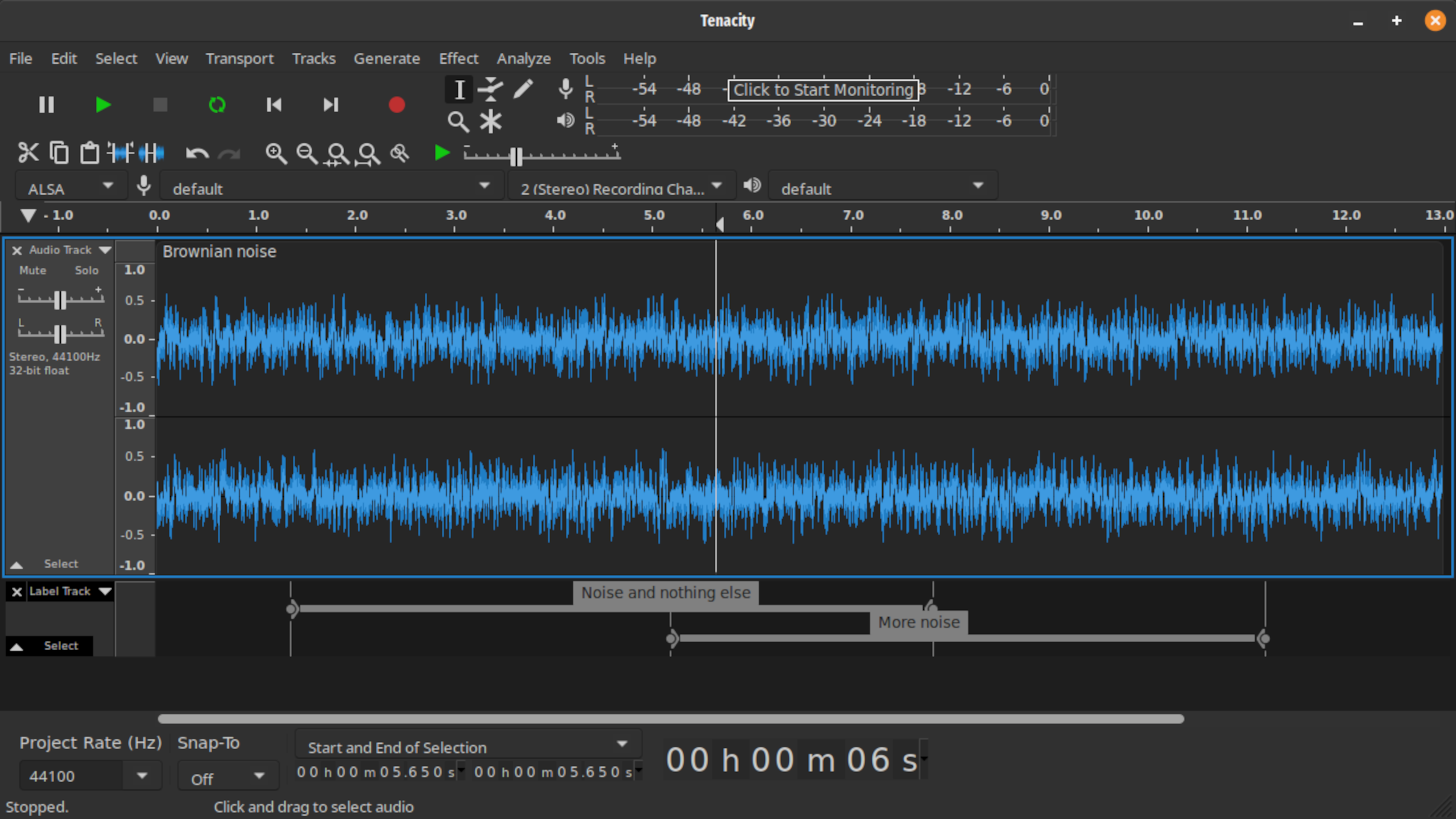
You should read up on Tenacity: https://tenacityaudio.org/docs/_content/Introduction_and_Motivation.html#history
....which is an open source fork of Audacity that forked a few years ago after Audacity got corporate bought out and immediately began enshittification (beginning with telemetry).
Anyway, so:
It may look familiar...
beatbox9
Yes, there is some stuff you can do to lighten gnome's ram usage: https://www.reddit.com/r/Fedora/comments/11aw1uw/should_gnome_use_this_much_ram_and_why_does/
But if it's not an actual issue, I wouldn't mess with it. RAM is there to be used, and your computer should be managing it efficiently. 8GB should be fine.
Also, firefox is an independent browser--it runs within gnome but it is not a part of gnome. And there are plenty of other browsers you can try. Like try brave origin, for example.
beatbox9
I've been using Linux for around 30 years, with it being my main desktop OS for the past 20+ years. I currently also use macOS. The last Windows I used was Windows XP.
So the first thing I'll offer is:
AMA
But to answer your specific question: you're basically just missing out on a community-driven OS that just tries to work. It doesn't try to analyze everything you're doing in order to advertise to you.
It just tries to run your computer hardware and apps and help you be productive. That's it.
And it's modular. So if you don't like one component--like the entire desktop--you can easily just swap it out. Because the entire desktop GUI is just an app.
Anecdotally:
I've very occasionally had to do stuff in Windows--like maybe once a year. And I am always so lost--I find it difficult and confusing.
I had to set up a brand new Windows laptop for my niece a few months ago. Prior to this, she was using a Chromebook, which is (ironically) a type of Linux. I was astounded by how intrusive Windows was and how long it took to set up. For example, it immediately asked for an email address...and I was wondering why? It's her local, personal computer, not an online website.
It took probably an hour to sign in to everything using a personal email address and set things up. I've installed an entire Linux distro--an entire operating system--in less time than it took to set up Windows.
After it was finally set up, it started using/synching to onedrive (?) which I think is an online cloud drive instead of her local drive. So it took a while to sort that whole situation out. And then it was like update after update where you couldn't use the computer and had to constantly reboot.
And then there was all this software (like I think antivirus and other stuff?) that wasn't clear if it was included or a trial or what half of it even was.
Linux is none of that. I can install an entire Linux distro--an entire operating system--in less time than it took to set up Windows on a brand new machine. And I know this because I set up 2 Linux machines for other family members just last week--one for someone who was used to Windows and the other for someone who was used to macOS. Here's what I ended up making them look like:
https://www.reddit.com/r/linux4noobs/comments/1xbb8kv/comment/19rfpp4xno2w0/
And Linux is modular, so your system files and personal files are separated, making it extremely easy to move files around, back things up, clear out any weird configurations, and migrate to a new computer or operating system.
(macOS is also a Unix-like system, so it's very similar to Linux in this sense; and this is why it's so easy to do incremental backups, migrate to a new laptop, etc.)
Anyway, that's all the stuff you're missing: freedom from corporate lock-in & BS & all the tagalong stuff they use to monetize you.
beatbox9
1) Shoot raw. That's where you get your extra tolerance from. Also, remember that digital clips highlights abruptly; and that each color (red, green, blue) clips at a different point so highlight color reconstruction can be strange. In other words, give yourself a bit of room in the highlights and avoid overexposure on digital. Digital is much better about pushing shadows than it is about pulling highlights. ie. Your goal in digital is to expose as much as you can without clipping highlights.
Also, embrace Auto-ISO. This is a huge difference between film and digital: the ISO/exposure order of operation is completely reversed.
You may find this article on the topic useful: https://arslaan.studio/the-digital-iso-film-analogy/
2) I've purchased split prism focusing screens a while ago from this site: https://www.focusingscreen.com/index.php?cPath=22_139
IIRC, I believe they are based in Japan. I never had a Df but I did buy some of those for my other SLRs, like my D750 and D810. (I now mainly shoot the Z system, including a ZF).
beatbox9
That was a question to get you thinking if you actually know or should spend time trying to learn. I would say that:
- your overall use case
- your hardware
- the way it looks
- the apps you want to use, and
- how new the apps you want to use are
- the defaults / initial setup
typically all have very little to do with selecting a distro. They can have a little influence on a good distro, but very little overall.
Instead, the most important aspects in selecting a distro are the maintenance & support schedules for core OS software (like the Linux kernel, GUI desktop environments, maybe proprietary drivers and codecs, etc).
Think about a distro like this: imagine there were 5 different companies offering a Microsoft Windows subscription. It's all the same Microsoft Windows. Maybe each themes it a bit different or preinstalls a few different apps that you can easily install yourself in a few minutes--but it's all the same Windows...
...except: do you go with the company that forces you to upgrade from Windows 7 to 8 to 10 to 11 every 6 months, or do you go with the one that lets you stay on a single version of Windows (like Windows 10) for 5 years before you have to upgrade to 11?
That's basically the main difference between distros in 2026: their upgrade and maintenance schedules for core OS software.
beatbox9
For those already using Linux, what advice would you give someone just starting out?
Learn what a distro is. Don't just dumbly listen to the echo chamber of all of the other noobs who themselves still don't know what a distro is, even after years.
Spend a few days learning the purpose and differentiators of distros and what problems they're trying to solve. Because then you'll learn that:
- your overall use case
- your hardware
- the way it looks
- the apps you want to use, and
- how new the apps you want to use are
- the defaults / initial setup
typically all have very little to do with selecting a distro.
Also, don't listen to fanboys, and haters. Remember: the most advanced linux users tend to pick the easiest distros, because one of the core purposes of a distro is to make things easier and less work for the user. ie. the easiest distros tend to also be the most advanced in having done done the work that distros are supposed to do really well.
It's just an OS. If you're spending too much time thinking about it or troubleshooting or tending to it, then it sucks as an OS. But if you spend most of your time within your apps, occasionally clicking update, and everything just continues to work over time, it's a great OS.
Related: don't conflate initial setup effort with ongoing usage. I know plenty of completely non-technical people who could not tell you what Linux is who have been using Linux for years without issue.
beatbox9
And what do you think anything you listed has to do with a distro?
lol why are you hypocritically doing it then, butt kinkier?